
Which air-cargo file do you have?
General AWBs, scans, HAWBs, MAWBs, manifests, and mixed document packets need different schemas. Choose the matching workflow to keep identifiers, relationships, totals, and exceptions reviewable.
Air cargo workflow finder
Which air-cargo file do you have?
Choose from the file in front of you and the output you need.01A regular AWBStart with airway bill number, route, pieces and weight.02A stamped or image-only AWBUse OCR and keep source-page exceptions visible.03A forwarder-issued house billPreserve the house shipment and its master reference.04A carrier-level master billCapture carrier, flight, consolidated weight and charges.05A flight manifest with many AWBsSeparate the flight header from one row per airway bill.06A mixed air-freight packetClassify documents before linking fields across them.
Packet data model
Do not compress six document types into one unauditable wide table
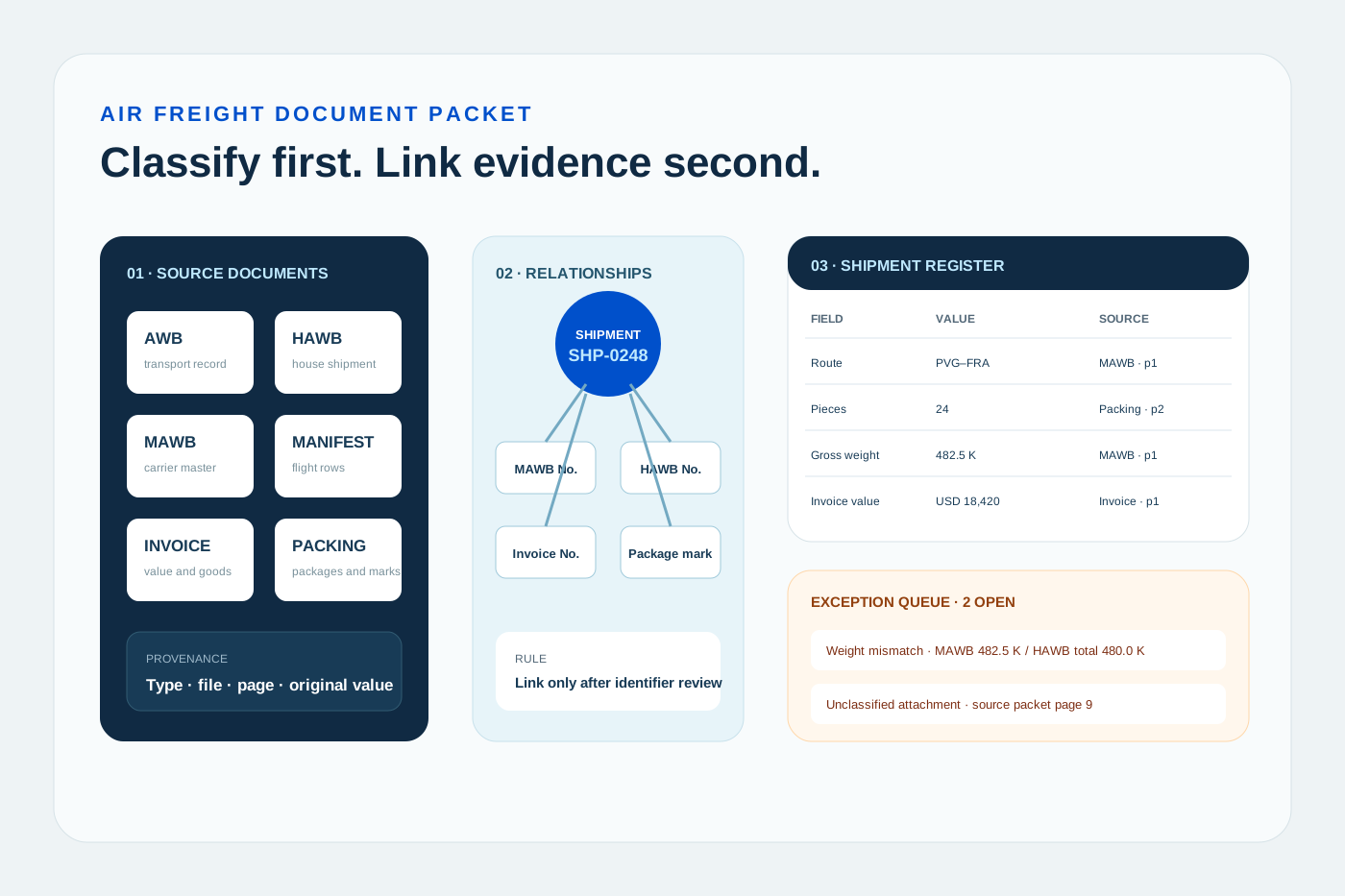
A durable air freight packet output needs a shipment register, document register, repeating detail tables, and an exception queue connected by reviewable keys.
Transport documents
Carry contracts, master-house relationships, and flight-level shipment lists.
AWBHAWBMAWBCargo manifestTrade documents
Provide value, goods, packaging, and declaration-preparation evidence.
Commercial invoicePacking listCertificate referencePurchase referenceRelationship keys
Connect levels only with identifiers that have been confirmed.
Shipment IDMAWB No.HAWB No.Invoice No.Package markProvenance and exceptions
Preserve original values and differences instead of silently overwriting them.
Document typeSource pageOriginal valueNormalized valueException reasonWhat makes this document hard
These are the real formatting and workflow issues teams usually run into.
01
One packet mixes transport records, trade documents, and internal attachments, while filenames and page order may not identify document type reliably.
02
AWBs, invoices, and packing lists repeat parties, pieces, weights, and references, but each value has a different source and operational meaning.
03
Flattening every page into one wide sheet destroys one-to-many relationships and hides missing, conflicting, or unclassified evidence.
How FOVATA handles it
The goal is not just conversion. The goal is structured output your team can use immediately.
Classify pages as AWB, HAWB, MAWB, cargo manifest, commercial invoice, packing list, or unknown while retaining file and page provenance.
Use a document-specific schema for each type, then connect records with confirmed keys such as Shipment ID, MAWB No., HAWB No., or invoice number.
Normalize shared fields into an operations register while preserving original values, source documents, and review status.
Export missing documents, piece or weight conflicts, identifier mismatches, and unclassified pages to an exception queue for operations review.
AI Smart Extraction
Best when the source layout is inconsistent and the target output needs to follow business logic.
Excel-ready output
The point is not to mirror the source page. It is to create an output file that saves follow-up work.
Fields teams usually extract
Document TypeSource File / PageShipment IDMAWB No.HAWB No.Invoice No.ShipperConsigneeOriginDestinationFlight No. / DatePiecesGross WeightChargeable WeightInvoice AmountCurrencyException TypeReview Status
Teams that benefit most
Air import and export operations
Freight shared service centers
Documentation and archive teams
TMS data-entry teams
Automation owners processing mixed shipment packets
Recommended workflow
A practical three-step path from source file to usable Excel output.
1
Upload one shipment packet or operating batch, classify each page, and retain the original file, page, and document type.
2
Extract fields by document type, then connect AWB, HAWB, MAWB, manifest, invoice, and packing-list records using confirmed business keys.
3
Export the shipment register, document details, and exception queue; resolve conflicts before mapping to a TMS, ERP, or CSV specification.
FAQ
Which air freight documents can be processed in one packet?
A packet can contain AWBs, HAWBs, MAWBs, cargo manifests, commercial invoices, and packing lists for one shipment or batch. Document type and source page should remain explicit so values from different authorities are not silently merged.
Can it classify AWBs, invoices, and packing lists automatically?
Classification can use content and layout, but incomplete pages, missing titles, or multiple documents on one page may still require confirmation. Uncertain pages should remain Unknown or enter an exception queue.
What happens when pieces or weights disagree across documents?
Keep every source value and its provenance, then create a conflict item. The workflow should not choose one document and overwrite the others without an authorized operational decision.
Can the output post directly to CargoWise or another TMS?
It can prepare Excel or CSV fields for import, but tenant-specific columns, codes, and allowed values must be confirmed. This page does not claim a direct integration or automatic posting.
How is this different from the HAWB, MAWB, and manifest pages?
The document pages go deeper on one source type. This page owns mixed-packet classification, relationships, and cross-document exceptions, which is a separate search and operations job.
Use this page as your first test scenario
Start with one complete packet that operations staff have already verified. Test classification, relationship keys, and exception rules before adding more document types or destination-system fields.