
Which air-cargo file do you have?
General AWBs, scans, HAWBs, MAWBs, manifests, and mixed document packets need different schemas. Choose the matching workflow to keep identifiers, relationships, totals, and exceptions reviewable.
Air cargo workflow finder
Which air-cargo file do you have?
Choose from the file in front of you and the output you need.01A regular AWBStart with airway bill number, route, pieces and weight.02A stamped or image-only AWBUse OCR and keep source-page exceptions visible.03A forwarder-issued house billPreserve the house shipment and its master reference.04A carrier-level master billCapture carrier, flight, consolidated weight and charges.05A flight manifest with many AWBsSeparate the flight header from one row per airway bill.06A mixed air-freight packetClassify documents before linking fields across them.
Scan review checklist
Treat image defects and AWB field errors as separate problems
Success is not the amount of OCR text returned. It is whether critical operational fields can be checked against the source and uncertain values are visibly queued for review.
Image and provenance
Record skew, crop, blur, occlusion, and duplicate-page conditions.
Source fileSource pageRotationCrop statusImage qualityIdentifiers and route
Review identifiers that are vulnerable to similar-looking characters.
AWB No.Carrier prefixOriginDestinationFlight No.Cargo and charges
Separate numeric values from units so decimals and K/L codes survive.
PiecesGross weightUnitChargeable weightCurrencyChargesExceptions and review
Leave uncertain fields blank or flagged instead of inferring them.
Review statusException reasonReviewer noteReviewed atWhat makes this document hard
These are the real formatting and workflow issues teams usually run into.
01
Carbon copies, faxes, and phone photos can contain background noise, folds, shadows, or bleed-through that changes individual digits.
02
Party, routing, and charge areas often lack complete table borders, so plain OCR text does not reconstruct the business fields.
03
Multi-page scan packets may contain attachments, duplicate pages, or several shipments, making file and page provenance essential.
How FOVATA handles it
The goal is not just conversion. The goal is structured output your team can use immediately.
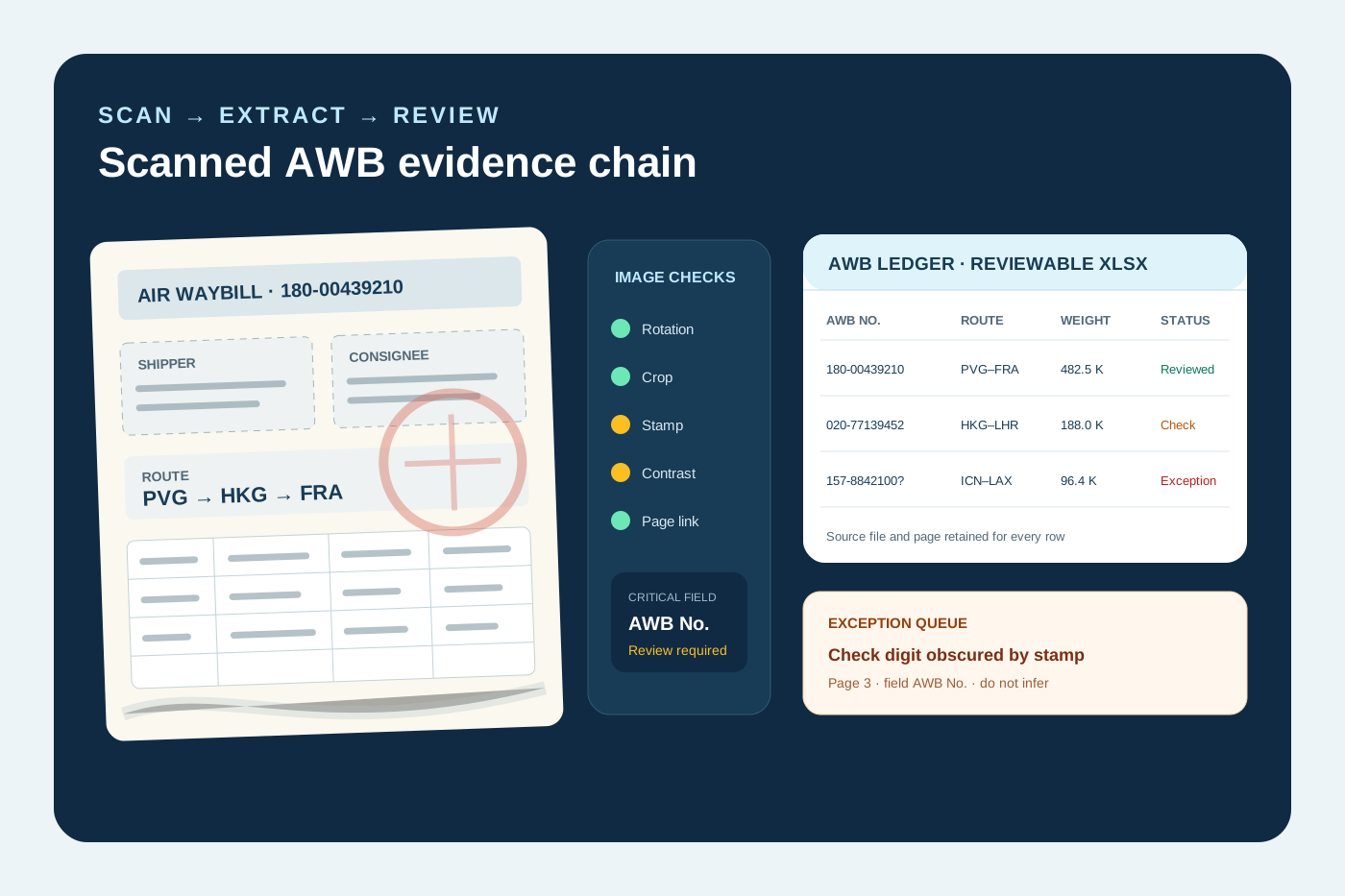
Assess page orientation, crop, and readability before extracting AWB fields instead of treating raw OCR text as a finished ledger.
Mark AWB numbers, airport codes, dates, pieces, weights, and amounts as critical fields for explicit review.
Retain source file, source page, and review status; route obscured or conflicting values to an exception queue without guessing.
Reuse instructions for recurring carrier or forwarder scans while sampling every new layout and low-quality batch.
AI Smart Extraction
Best when the source layout is inconsistent and the target output needs to follow business logic.
Excel-ready output
The point is not to mirror the source page. It is to create an output file that saves follow-up work.
Fields teams usually extract
AWB No.ShipperConsigneeIssuing CarrierOriginDestinationFlight No. / DatePiecesGross WeightChargeable WeightNature of GoodsCurrencyChargesSource PageReview Status
Teams that benefit most
Air freight operations
Archive digitization teams
Freight data-entry teams
Shared service centers
Teams processing photographed or faxed AWBs
Recommended workflow
A practical three-step path from source file to usable Excel output.
1
Upload scanned AWB PDFs, photos, or an image batch and check page orientation, edges, and legibility.
2
Define the AWB fields and flag identifiers, airport codes, dates, weights, and amounts for human review.
3
Export Excel with source pages and review status, keeping obscured, blank, or conflicting fields in an exception queue.
FAQ
How is scanned AWB to Excel different from regular AWB PDF conversion?
A text PDF may expose characters directly. A scan first requires image and layout recognition, and stamps, carbon-copy backgrounds, or skew increase uncertainty. This page therefore emphasizes provenance, exceptions, and critical-field review.
Can it process an air waybill photographed with a phone?
It can be tested when all corners are visible, glare is limited, and the AWB number, weights, and charges are readable. Values that cannot be read should remain unresolved rather than be invented.
Can one batch contain scans from different airlines?
Yes, with one shared target schema, but carrier, forwarder, and historical layouts vary. Grouping similar layouts and calibrating a representative sample reduces review debt.
Can OCR results go straight into a TMS without review?
That is not recommended. AWB numbers, airport codes, dates, weights, and charges affect downstream operations and should be checked against destination-system rules before import.
Can it read stamps or handwritten corrections?
Clear content may be recognized, but overwritten text, cursive handwriting, and low-contrast carbon copies carry more uncertainty. This page does not promise complete handwriting or occlusion recovery.
Use this page as your first test scenario
Start with a representative set that includes clean scans, skewed pages, stamps, and carbon-copy noise. Validate critical identifiers and weights before expanding the batch.