Administrative intake register
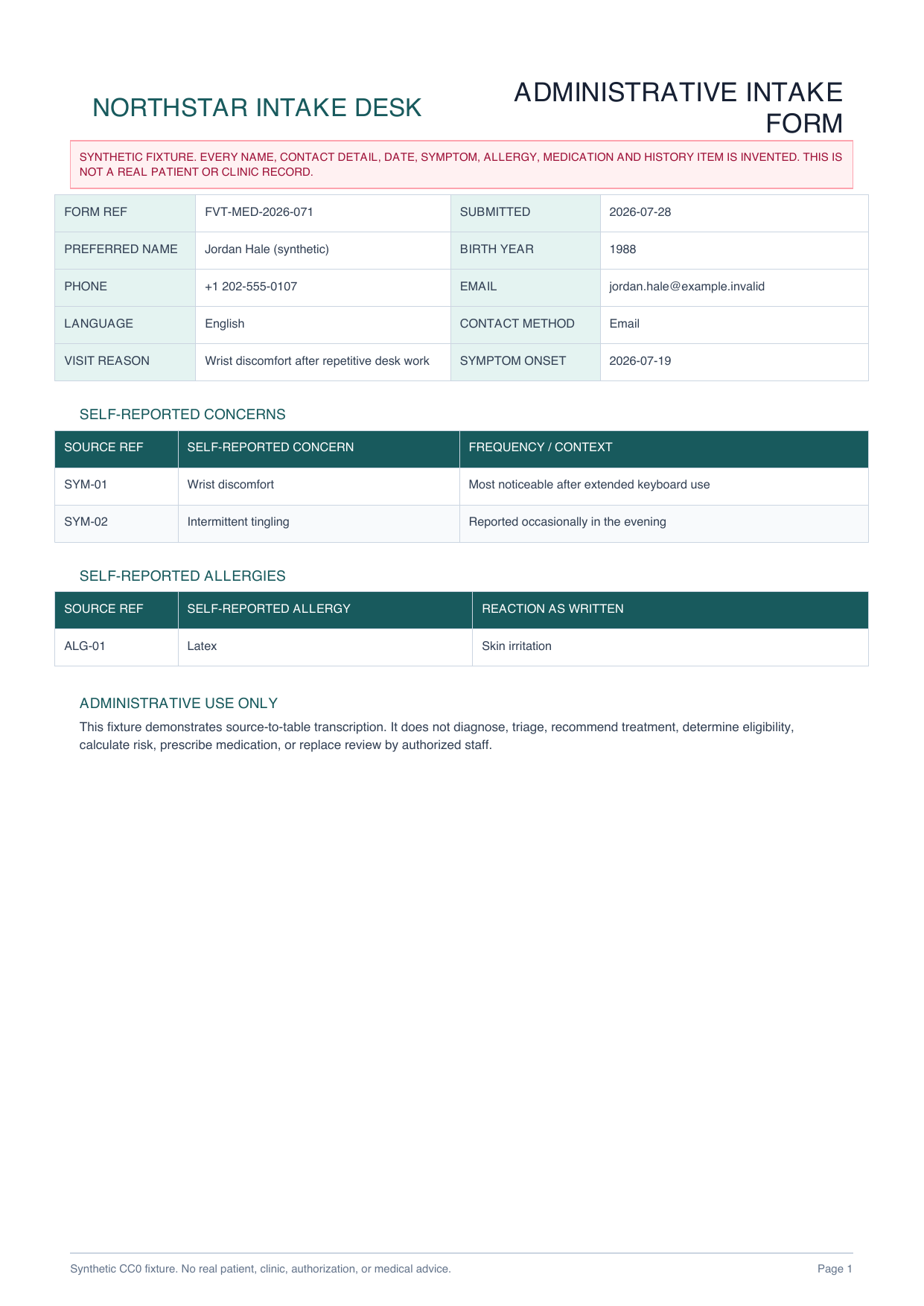
Form reference, source pages, submitted date, preferred name, birth year, contact details, language and contact method

MEDICAL INTAKE FORM PDF TO EXCEL
Organize authorized, self-reported intake fields into a source-linked administrative workbook without making a clinical decision.
PLAIN-LANGUAGE FIELD REQUEST
“Create an intake register with source page, form reference, submitted date, preferred name, birth year, contact preference, visit reason and symptom onset. Create separate rows for each self-reported concern, history item, medication and allergy. Preserve the wording and page reference. Leave uncertain values blank or flag them. Do not diagnose, triage, infer severity or cause, recommend treatment, prescribe, calculate risk, determine eligibility, or make an insurance decision.”
Form reference, source pages, submitted date, preferred name, birth year, contact details, language and contact method
Visit reason, symptom onset and source-linked concern or history rows preserved exactly as written
Separate self-reported item, strength or reaction, frequency, source page and reviewer status columns
Uploader authority, source completeness, minimum-necessary fields and explicit non-clinical decision boundaries
INSPECTABLE SYNTHETIC EVIDENCE
Every name, contact detail, date and health statement is invented. The workbook is a declared reference workbook, not a measured or saved production AI result.
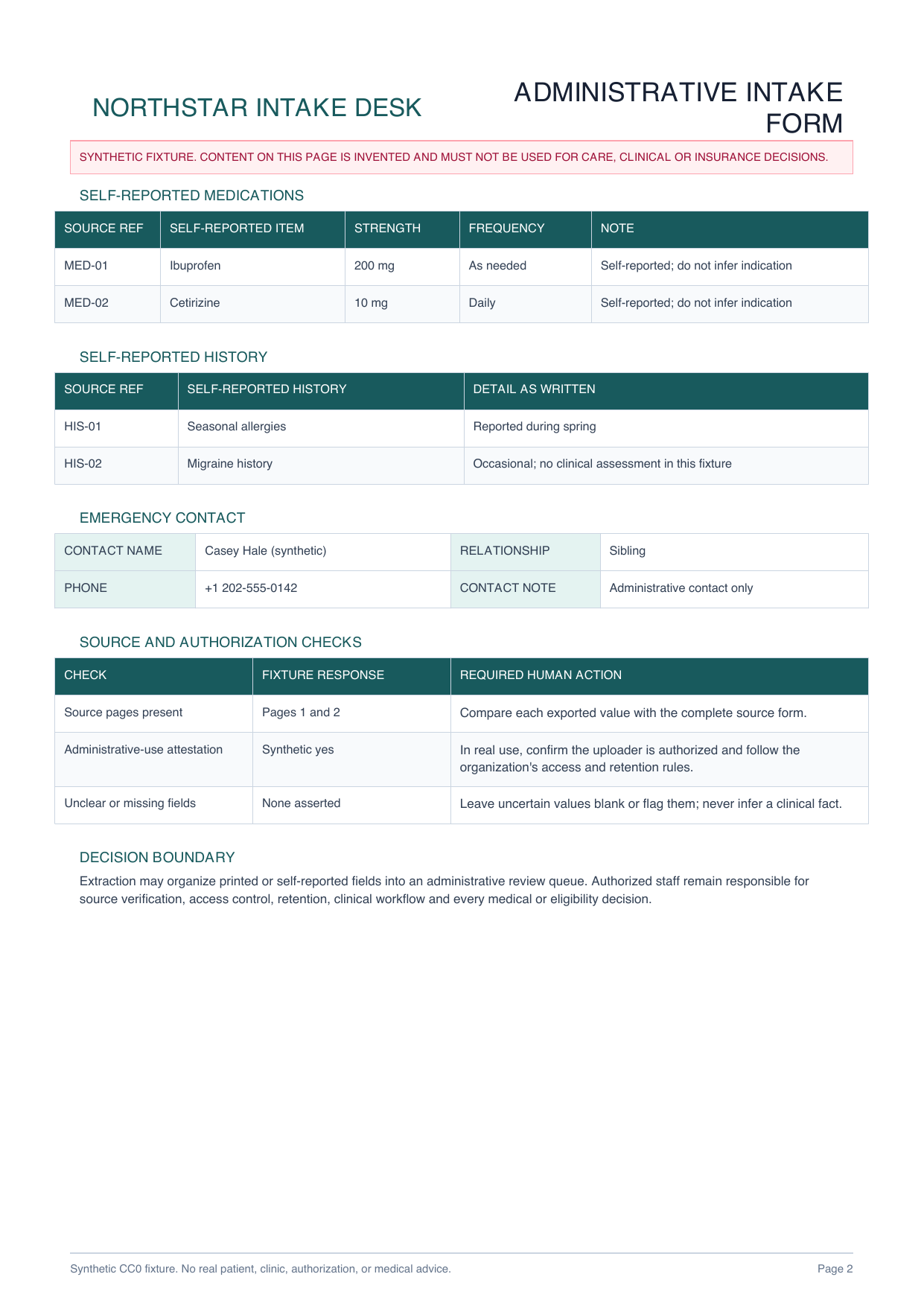
Administrative identity fields, repeated concerns, medications, allergies, history and review controls make cross-page extraction inspectable.
Download PDF
Intake, concerns and history, medications and allergies, and authorization checks remain separate for minimum-necessary review.
Download XLSXAUTHORIZED ADMINISTRATIVE REVIEW
Only authorized staff should upload a complete source form under the organization's approved access and retention workflow.
Select only the administrative columns needed for the authorized task and preserve page references and source wording.
Compare each value with the source. Leave uncertain fields blank or flagged and keep diagnosis, triage, treatment and eligibility outside extraction.
Do not upload a form unless you are authorized to process it. Export only the minimum necessary fields, restrict access, follow the organization's retention rules and verify every value against the source. This page does not claim HIPAA or other regulatory certification and does not diagnose, triage, prescribe, recommend treatment, determine risk or eligibility, or replace a clinician or authorized reviewer.
Administrative fields can include form reference, dates, contact preferences, visit reason, reported concerns, medications, allergies, history items, emergency contact and reviewer status.
Yes. The declared workbook separates the intake register, concerns and history, medications and allergies, and a review checklist so repeated entries retain their source page and reference.
No. Every identity and health detail is invented. The workbook is a declared reference structure, not a measured or saved production AI result.
No. This page only demonstrates administrative field organization. It does not diagnose, triage, prescribe, recommend treatment, determine risk or eligibility, or replace authorized human review.
No. It makes no HIPAA or other regulatory certification claim. Each organization must assess its own authorization, access, retention, security and regulatory requirements before processing health information.
Confirm authority, request only necessary fields and keep qualified people responsible for every clinical or eligibility decision.
Start AI extraction