Purchase order PDF
Purchase orders
A PO register with supplier, delivery, item, quantity and amount fields.

These are the real formatting and workflow issues teams usually run into.
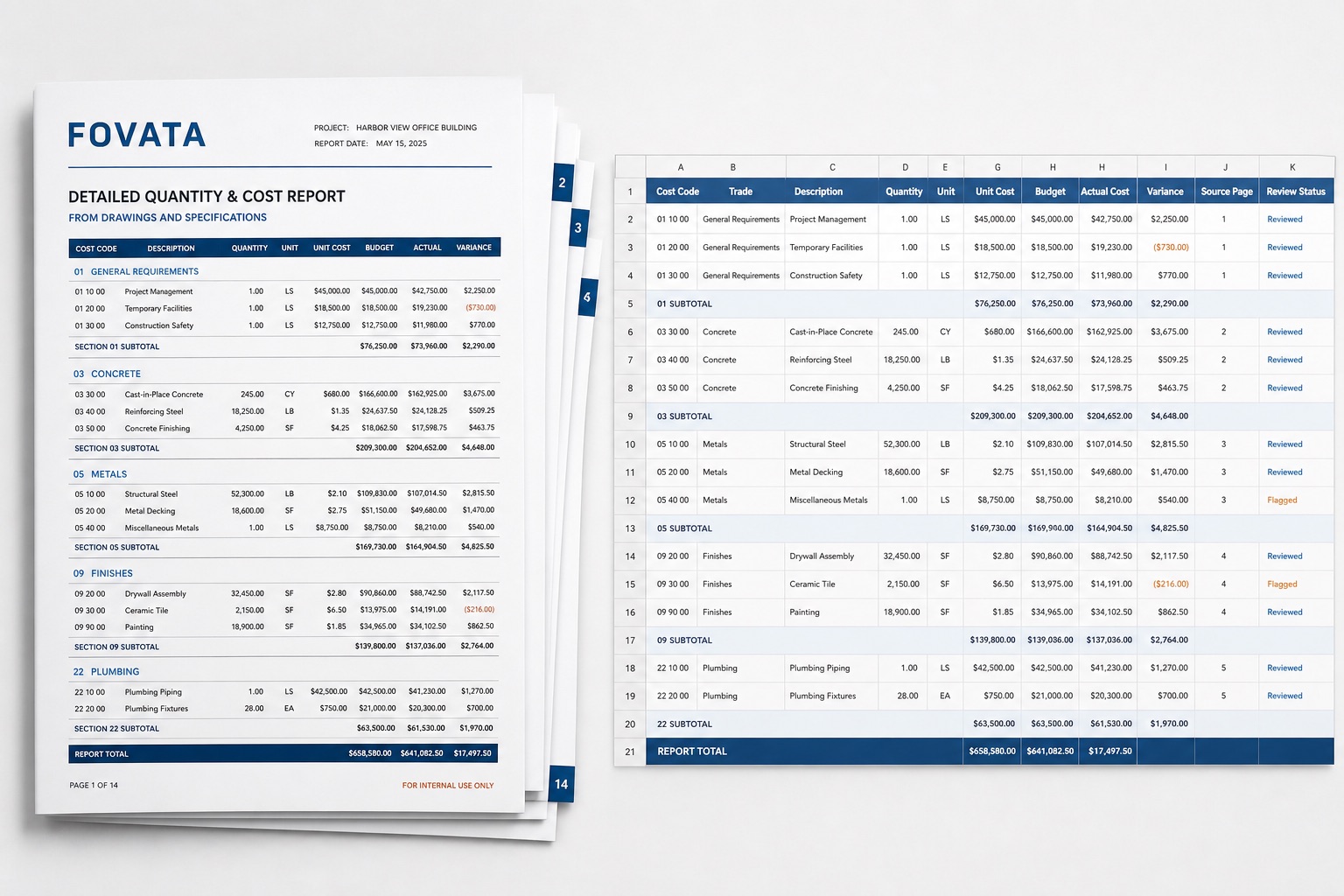
Cost code, trade, description, quantity, and unit must stay on the same row, even when scans or page breaks disrupt alignment.
Section subtotals and report totals belong to different hierarchy levels and should not be mistaken for ordinary line items.
Budget, actual, and variance values must preserve signs and currency formatting, with material figures traceable to the source page.
The goal is not just conversion. The goal is structured output your team can use immediately.
Organize rows by cost code and trade while retaining quantity, unit, unit cost, budget, and actual cost.
Describe line-item, subtotal, and total rules in plain language to exclude repeated headers and preserve hierarchy.
Export variance, source page, and review status as separate columns so cost teams can filter exceptions.
Use the workbook for data entry and review, not as confirmation of quantities, price reasonableness, payment terms, or final account values.
Best when the source layout is inconsistent and the target output needs to follow business logic.
The point is not to mirror the source page. It is to create an output file that saves follow-up work.
A practical three-step path from source file to usable Excel output.
Upload the cost report, quantity schedule, or estimate PDF and define line-item fields and hierarchy rules.
Extract cost codes, quantities, rates, budgets, actuals, and variances while marking subtotals and source pages.
Review units, signs, subtotals, and totals, then export Excel for the cost register or further analysis.
Yes. Define the hierarchy rules and export row type as a field. Review each subtotal against its source page after extraction.
Yes. Both can use cost code, description, quantity, unit, and amount fields, but separate saved instructions are recommended for each document structure.
No. It reduces entry and cleanup work. Quantities, rates, scope, and settlement amounts still require authorized review.
If your team copies construction cost lines one by one, test a multi-page report to validate row alignment, hierarchy, and amount review.