
What makes this document hard
These are the real formatting and workflow issues teams usually run into.
01
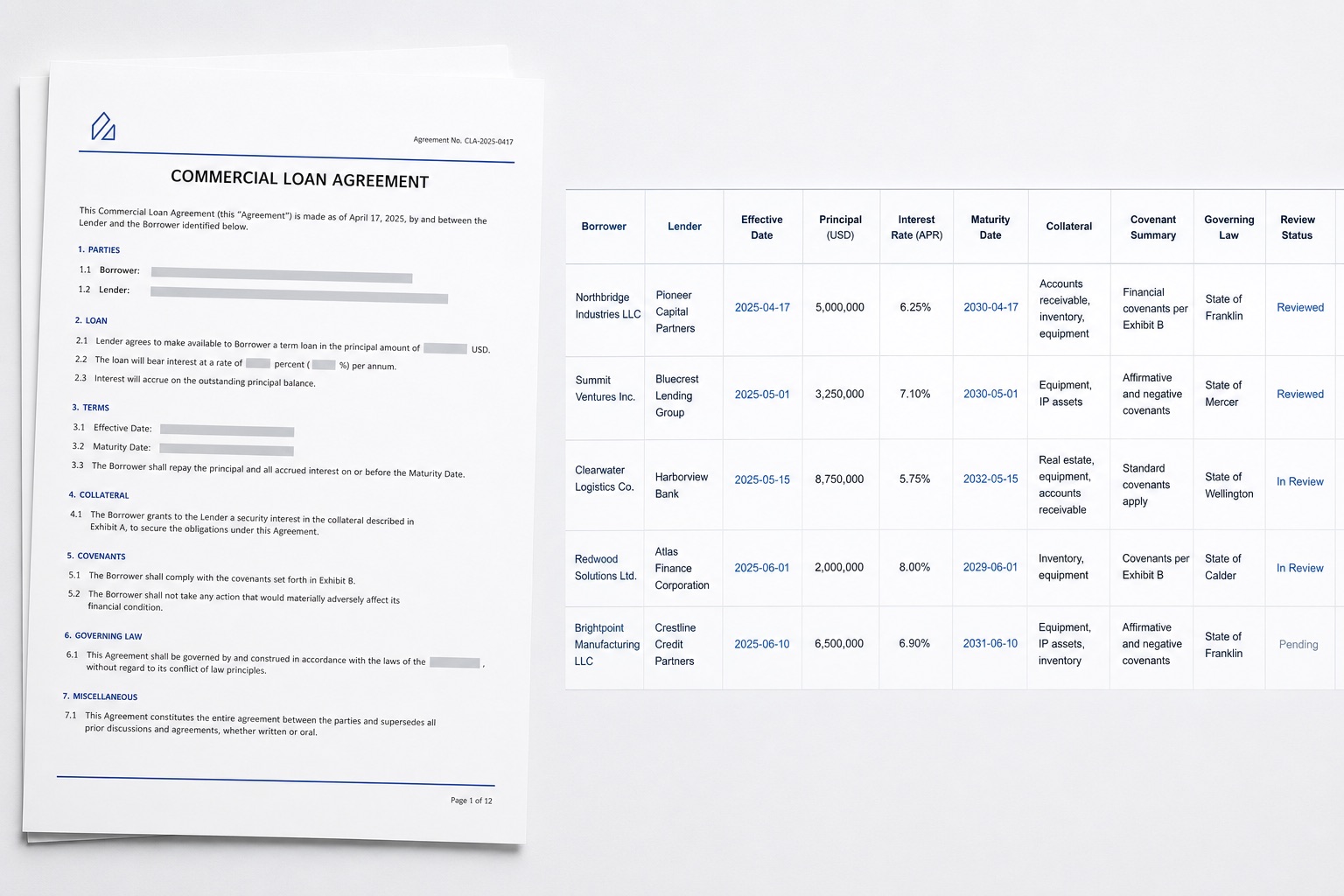
Borrower, lender, principal, rate, and maturity details can appear in different sections, which makes fixed-coordinate templates fragile.
02
Collateral, financial covenants, events of default, and governing law are long-form clauses rather than neat table cells.
03
High-impact fields need a path back to the source text and page. Structured output cannot replace legal judgment.
How FOVATA handles it
The goal is not just conversion. The goal is structured output your team can use immediately.
Describe the required fields and clauses in plain language, then apply one Excel structure across different agreement layouts.
Retain source pages, clause excerpts, and review status so legal or operations teams can check each material result.
Separate agreement-level fields from repeating covenant or security items to reduce copying and spreadsheet cleanup.
Use the workbook as a contract register or review worksheet, not as an automated opinion on validity, compliance, or risk.
AI Smart Extraction
Best when the source layout is inconsistent and the target output needs to follow business logic.
Excel-ready output
The point is not to mirror the source page. It is to create an output file that saves follow-up work.
Fields teams usually extract
BorrowerLenderEffective DatePrincipalCurrencyInterest RateMaturity DateCollateralFinancial CovenantsEvents of DefaultGoverning LawSource PageReview Status
Teams that benefit most
Loan operations teams
Credit document staff
In-house legal teams
Contract managers
Finance teams maintaining loan registers
Recommended workflow
A practical three-step path from source file to usable Excel output.
1
Upload the loan agreement PDF and describe the agreement fields and clauses you need.
2
Extract the results into fixed columns while preserving source pages and text that still needs judgment.
3
Have an authorized reviewer verify amounts, dates, and clauses before exporting Excel for a register or downstream entry.
FAQ
Can a workflow include 80 to 120 fields from one agreement?
Yes. Start with representative agreements, clarify each field definition, and split complex clauses into independently reviewable columns.
Can different lender or law-firm layouts use one output structure?
Yes. A shared plain-language field specification can normalize the output, while source pages and excerpts support review of different wording.
Can the workbook be used as a legal or credit decision?
No. It reduces entry and location work, but it does not replace lawyers, credit professionals, or other authorized reviewers.
Use this page as your first test scenario
If your team maintains loan agreement fields by hand, start with a few different layouts and test the field definitions, source references, and review flow.